
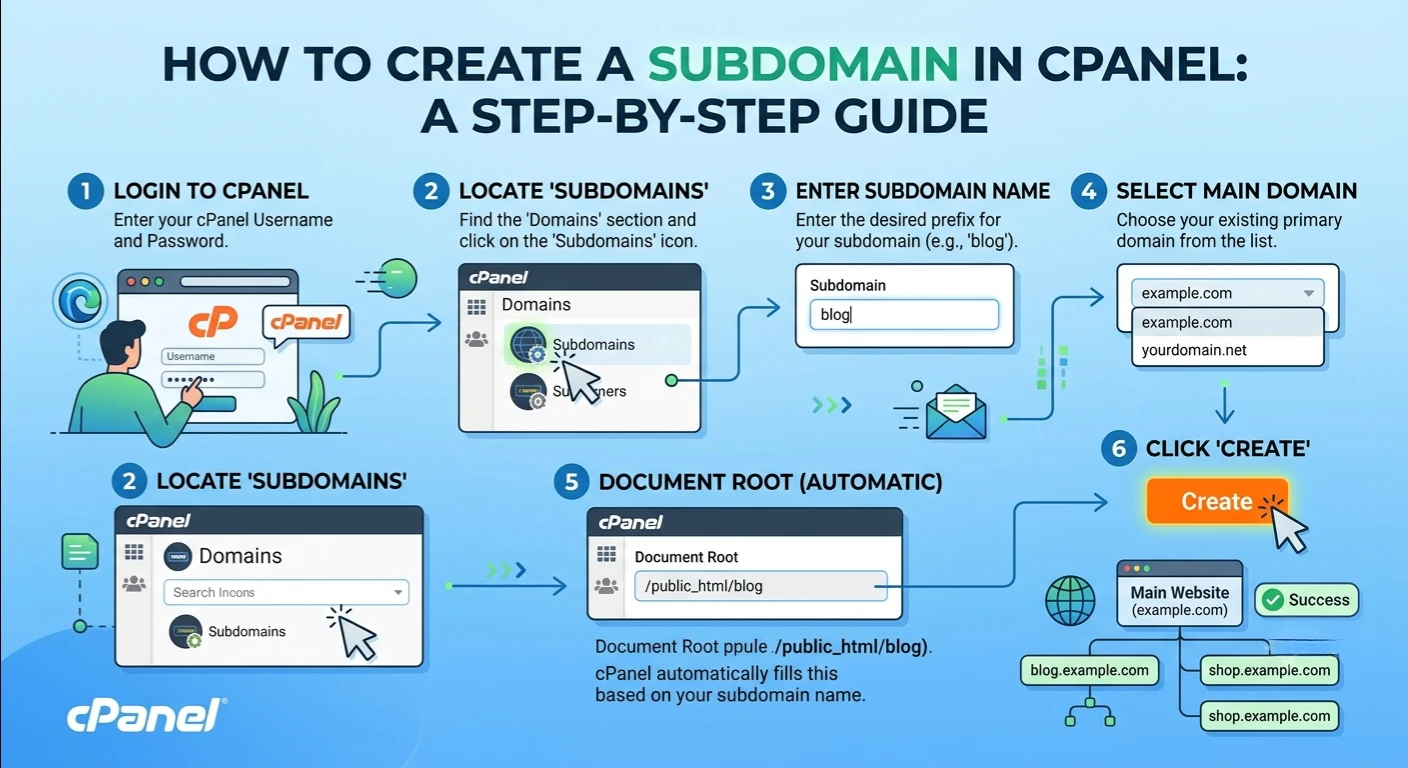
In this article, you will learn how to create subdomain in cPanel. A subdomain gives you the capability of segregating specific parts of your website without having to acquire another domain name. Whether you’re starting a blog, building a staging site, setting up a customer portal or hosting a separate application, a subdomain is a very easy and professional solution.
All web hosting companies handle subdomains, and even those who don’t will let you get it together in your cPanel hosting with ease even if you are a novice. The web hosting control panel lets you create, manage and customize subdomains in a matter of minutes.
This tutorial explains step-by-step how to create subdomain in cPanel, certain important settings, best practices and common issues that you should be aware of when creating your subdomain in cPanel.
What is a Sub Domain?
A subdomain is a section of your primary domain; it creates a separate section of your website. You don’t have to register another domain, but add a prefix in front of your existing domain.
For example:
- blog.example.com
- shop.example.com
- support.example.com
While allowing each website subdomain to have its own files, applications or even a completely new website, all of which are linked to your main website.
What is the Point of Having a Subdomain?
Website owners have a lot of reasons for creating subdomains. A business can start a blog or developers can build staging websites to test changes to a website. Customer support can be a division of the ecommerce site or a customer service website, and teaching institutions often develop learning platforms.
A custom subdomain will also help to organize the website and make it easier for users to locate the content.
Common uses include:
- Company blog
- Online store
- Support center
- Knowledge base
- Development environment
- Landing pages
- Client portal
Need to Meet Some Requirements
Before learning how to create subdomain in cPanel, make sure you have:
- You can then gain access to your hosting account and configure it to meet your needs.
- Your cpanel log in information
- A domain name that has been registered and is still live.
- A hosting plan that provides subdomains.
- To allow access to the files on your website.
Unlimited or multiple subdomains are usually offered as part of the most major Shared/VPS hosting packages.
Click Add a New Subdomain
Press Create a New Domain or Subdomains.
Type in the name of a subdomain you wish to create.
For example:
- blog
- store
- support
- dev
You will automatically be filled with your complete subdomain URL as:
blog.yourdomain.com
This is the address users will access your new section.
Select Document Root
A document root will be automatically created for the subdomain by cPanel.
For example:
public_html/blog
This folder will contain all website files and become the subdomain folder.
The public_html folder stays as your main website directory, and each subdomain will have its own distinct folder.
You will Setup the Subdomain
Click Create.
Your new cPanel subdomain will be created instantly.
It’s then live in your hosting account within a few moments.
Understanding the Document Root
The document root is the folder where all the files of your subdomain reside.
For example:
Main website:
public_html/
Subdomain:
public_html/blog/
All HTML pages, images, CSS files, JavaScript files and PHP applications are to be uploaded into this folder.
Having ordered files makes it easier to manage the website in the future.
Upload Files Using File Manager
After you have launched your subdomain, you need to open the File Manager in the cPanel section.
Go to the newly created subdomain folder.
Upload your:
- HTML files
- WordPress files
- Images
- CSS
- JavaScript
- PHP scripts
Only after you upload the necessary files will your web page appear.
DNS Settings Explained
Your cPanel hosting account will typically auto-create DNS records when you create a subdomain.
These DNS settings are used to inform browsers of the location of your subdomain.
If you are using a different DNS provider (Cloudflare, domain registrar etc.) you will need to add an A Record / CNAME Record yourself.
If you have a subdomain, its proper configuration guarantees that it will load correctly on the internet.
DNS Propagation
You’ll only see your subdomain once you’ve created it.
This is due to DNS propagation.
Propagation typically takes:
- A few minutes
- Up to 24 hours
- Occasionally 48 hours
This time different ISPs change their DNS records.
Install WordPress on Your Subdomain
A lot of website owners take advantage of subdomains to create unique WordPress installations.
After completing the subdomain setup, simply open the Softaculous Apps Installer or WordPress Manager in cPanel.
Choose your subdomain on the installation.
http://blog.example.com
to
https://blog.example.com
An HTTPS subdomain provides security, trust and better search engine rankings.
Some Frequently Occurring Issues
After a user creates a subdomain, sometimes there are problems. Common problems include:
Subdomain Doesn’t Load
Typically due to DNS propagation.
Please wait a few hours before proceeding to troubleshooting.
Incorrect Document Root
The website does not load if files are uploaded to the wrong folder.
Always ensure the proper document root.
Missing DNS Records
For external DNS providers, set up the necessary DNS records.
SSL Warning
If your browsers say that there’s an insecure connection, install or reinstall your SSL certificate.
Best Practices to Manage Subdomains
Adopting Good Practice leads to better performance and organization.
- Have memorable subdomains.
- For each subdomain directory, maintain different files.
- Regularly back up your hosting account.
- Install SSL Certificates on all subdomains.
- Keep the software of websites up-to-date.
- If changing hosts, be sure to observe DNS changes closely.
Over time these habits will make website management much easier.
Several Benefits to Using Subdomains
There are a number of advantages to creating subdomains.
- You don’t need to purchase additional domain to separate various sections of the website.
- Testing can be done safely for development teams.
- Regional websites can be developed for businesses.
- Marketing teams have the ability to create designated landing pages.
- Student portals can be split up in educational institutions.
Each subdomain for a website is independent, but linked to the main site.
Conclusion
Regardless of what you are using these sites for, building a blog, online store, staging environment or customer portal, subdomains are flexible without the need to register a separate domain. With the steps and best practices listed above, you can easily handle your cPanel subdomain and grow your website with your expanding online presence.