
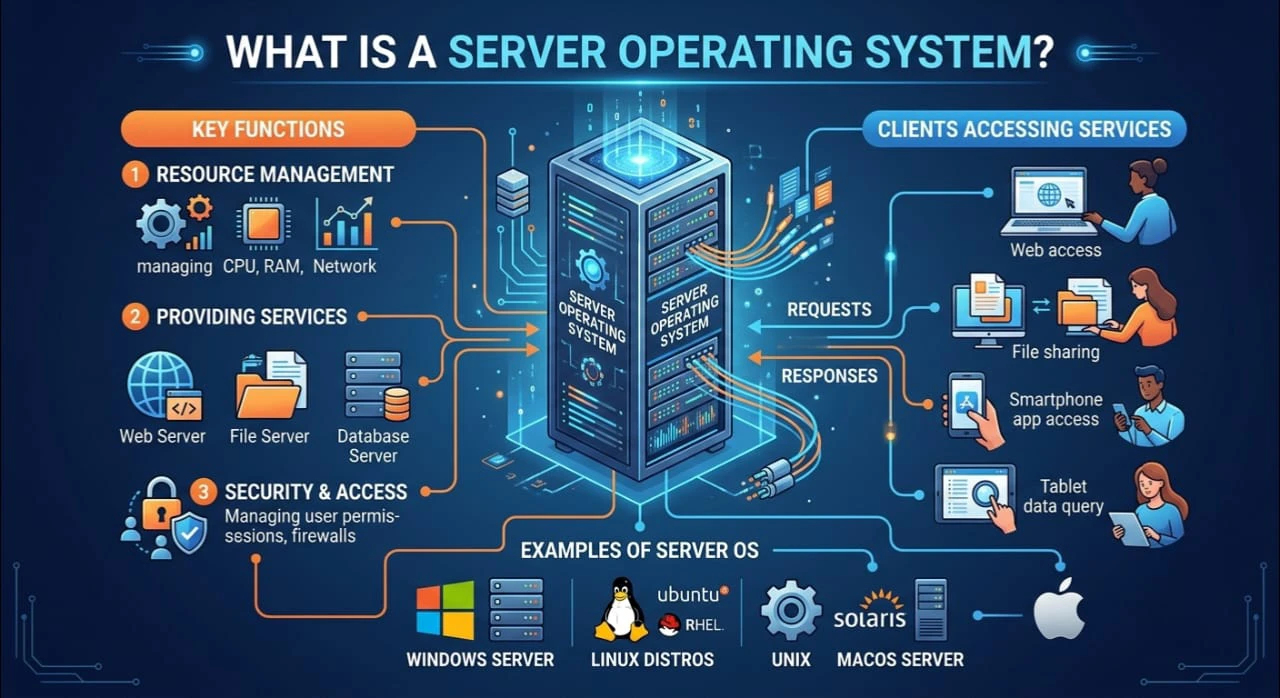
Today, we rely on computers connected to networks for many tasks, including web browsing, mobile services, banking, and cloud storage. A powerful system runs these services in the background, known as a server operating system.
One of the first questions you will have to answer when you are learning IT or networking is: What is server operating system? In simple terms, it’s the backbone of contemporary computing systems which manage resources, users, services in a networked environment.
We are going to learn about the definition of server operating system, why it is used, its features, types and its differences from a normal desktop OS.
What is the Server Operating System?
A server operating system (server OS) is a special kind of an operating system that is used for servers. It is primarily responsible for managing a network’s resources, supporting several users and enabling service to other computers (known as clients) through a network.
All server OSs are designed to be more stable, more secure and more performant in heavy workload environments than a standard desktop OS.
The meaning of the server OS is:
A network system for a computer to control data, applications, and resources and share them with other devices on a network.
Purpose of Server Operating System
The function of a server operating system is to efficiently serve more than one user and system simultaneously.
A few of the main functions are:
- Management of network resources such as files, printers, databases etc.
- For hosting websites and apps.
- Using sessions and cookies for tracking users and their access rights
- Providing centralized control of data
- Finding a way to make sure security and back-up management.
If it wasn’t for the server OS, large networks such as cloud platforms, universities and company systems wouldn’t work the way they do.
How Do Servers Operate?
To understand how a server operating system works, think of a computer that is linked to numerous other computers.
- The server is accepting requests from the client devices.
- Those requests are processed by the server OS.
- It distributes resources such as memory, CPU, or files.
- Respond with the appropriate answer to the client.
For instance: When you open a website, your browser will send a request to a server, the OS on the server will provide you with the information of the web page and your browser will return it to your device.
This ongoing communication is the means by which online services are made possible.
The Features of the Server Operating System
It differs from normal operating systems in the operating system (OS) that it is running on. Some key features are:
- Multi-user support: Supports thousands of users simultaneously
- Runs without frequent shutdowns: Runs without frequent shutdowns
- Security controls: Advanced firewall and access control systems
- CPU, Memory and Storage Management: Distributes CPU, memory and storage efficiently
- Allows an administrator to manage a server from a remote location.
- Reliability: Is dependable and secure.
- Low latency: Responds quickly to network requests.
The features make server OS suitable for enterprise use.
Basic Types of Server OS
Depending on usage and environment there are several types of server operating systems:
1. Windows Server Operating System
Microsoft Windows Server is a popular platform for businesses. It has an easy to use interface and also has good assimilation with Microsoft solutions.
2. Open Source OS for Servers
Use of Linux is open-source and widely used in Web Servers. It is renowned for stability, security and flexibility.
3. Unix-Based Server OS
For critical systems with high reliability, which are used in large organizations.
4. Cloud Server Operating System
Cloud platforms provide scalable computing power over the Internet, abstracted as virtualized environments of server OS running in the cloud.
Examples of Server Operating Systems
Examples of server OS are:
- Windows Server 2019 / 2022
- Ubuntu Server
- Red Hat Enterprise Linux (RHEL)
- CentOS
- Unix systems
These have various qualities depending on the application.
Difference Between Server OS and Desktop OS
The concept of difference between server OS and desktop OS is one of the most important.
| Feature | Server OS | Desktop OS |
| Security level used to achieve purpose | Low | Medium |
| Users | Multiple users | Single user |
| Performance | High and stable | General use |
| Basic security is the default security feature, while advanced security features are optional. | Advanced security features are optional and include more security measures than basic security features. | |
| For Windows Server/ Linux Server | For Windows 10/11 and macOS |
To sum up, the Server OS is designed for power and control, the Desktop OS for daily personal work.
Server OS Functions
The server OS functions are critical to the smooth operation of network systems:
- Assigning access rights and users to files, directories, and other objects
- Operations on the host’s operating system or file systems
- Controlling network traffic
- Managing databases
- Ensuring back-up and recovery systems are in place
- Monitoring system performance
These functions are used to make sure that all things run smoothly in large IT environments.
Network Operating System Overview
According to an OS overview for network operating systems, the server OS is an integral component of the network. It allows multiple devices to communicate with each other and ensures that the data is shared securely and efficiently across the network.
It is like a bridge that connects the user and the resources and allows centralized computing.
Role of Server OS in Networking
The function of server OS in networking is of great importance. It:
- Connects more than one device in a network.
- Ensures data is shared and communicated.
- Supports the use of resources.
- Supports Internet services and cloud computing.
If it were not for it, there would be no online services, banking systems, and social media platforms.
Enterprise and Cloud Server Operating Systems
In large enterprises, the enterprise server OS is used to run heavy workloads and business applications.
Cloud server operating systems, on the other hand, provides the power to the cloud platforms such as AWS, Azure and Google Cloud, and lets users use computing services when and where they want.
Conclusion
For anyone who is interested in IT, networking or cloud computing, it is very important to understand what is Server operating system. The server OS is the foundation of today’s digital infrastructure, handling data, users, and services on networks.