
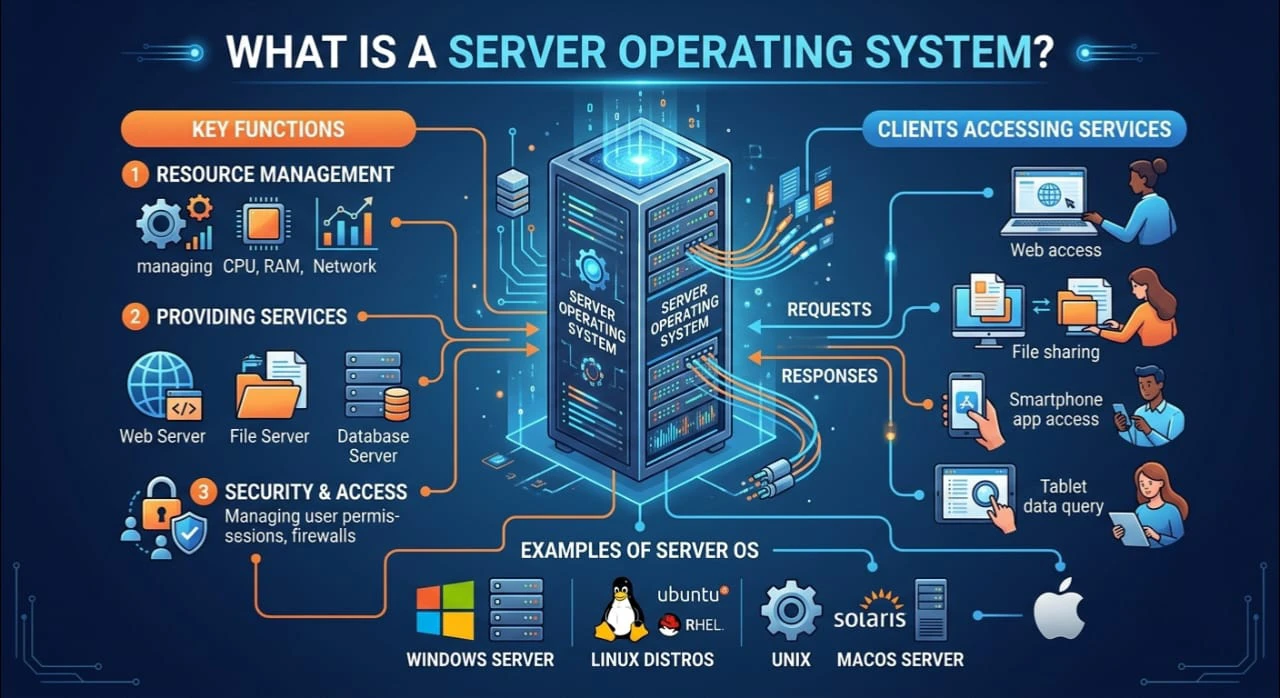
Today, we rely on computers connected to networks for many tasks, including web browsing, mobile services, banking, and cloud storage. A powerful system runs these services in the background, known as a server operating system.
One of the first questions you will have to answer when you are learning IT or networking is: What is server operating system? In simple terms, it’s the backbone of contemporary computing systems which manage resources, users, services in a networked environment.
We will explore the definition, purpose, features, and types of a server operating system, along with its differences from a regular desktop OS.
What is the Server Operating System?
A server operating system (server OS) is a specialized operating system that manages servers. It is primarily responsible for managing a network’s resources, supporting several users and enabling service to other computers (known as clients) through a network.
Server operating systems offer greater stability, security, and performance than standard desktop operating systems, especially under heavy workloads.
The meaning of the server OS is:
A network system for a computer to control data, applications, and resources and share them with other devices on a network.
Purpose of Server Operating System
The function of a server operating system is to efficiently serve more than one user and system simultaneously.
A few of the main functions are:
- Managing network resources such as files, printers, and databases.
- Hosting websites and applications.
- Managing user accounts, logins, and access permissions.
- Providing centralized control of data.
- Handling security, backups, and recovery.
If it wasn’t for the server OS, large networks such as cloud platforms, universities and company systems wouldn’t work the way they do.
How Do Servers Operate?
Think of a computer connected to numerous other computers to understand how a server operating system works.
- The server is accepting requests from the client devices.
- Those requests are processed by the server OS.
- It distributes resources such as memory, CPU, or files.
- Respond with the appropriate answer to the client.
For instance: When you open a website, your browser will send a request to a server, the OS on the server will provide you with the information of the web page and your browser will return it to your device.
This ongoing communication is the means by which online services are made possible.
The Features of the Server Operating System
A server OS differs from a desktop OS in several key ways. Key features include:
- Multi-user support: Serves many users and devices at the same time.
- High uptime: Built to run for long periods without restarts.
- Security controls: Firewalls, access control, and user permissions.
- Resource management: Distributes CPU, memory, and storage efficiently.
- Remote management: Administrators can manage the server from anywhere.
- Reliability: Stable performance under heavy workloads.
- Low latency: Responds quickly to network requests.
The features make server OS suitable for enterprise use.
Basic Types of Server OS
Depending on usage and environment there are several types of server operating systems:
1. Windows Server Operating System
Microsoft Windows Server is a popular platform for businesses. It has an easy to use interface and also has good assimilation with Microsoft solutions.
2. Open Source OS for Servers
Linux is open source and widely used for web servers. It is known for its stability, security, and flexibility.
3. Unix-Based Server OS
Unix-based systems such as IBM AIX and Oracle Solaris are used in large organizations for mission-critical workloads that need very high reliability.
4. Cloud Server Operating System
Cloud server operating systems run inside virtualized environments on cloud platforms, providing scalable computing power over the internet.
Examples of Server Operating Systems
Examples of server OS are:
- Windows Server (latest version)
- Ubuntu Server
- Red Hat Enterprise Linux (RHEL)
- Rocky Linux / AlmaLinux
- Unix systems (AIX, Solaris)
These have various qualities depending on the application.
Difference Between Server OS and Desktop OS
The concept of difference between server OS and desktop OS is one of the most important.
| Feature | Server OS | Desktop OS |
|---|---|---|
| Main purpose | Serves data and services to many clients | Everyday personal computing |
| Users | Many users at the same time | Usually one user at a time |
| Security level | High, with advanced access controls | Basic to medium |
| Performance | Optimized for heavy, continuous workloads | Optimized for general use |
| Uptime | Designed to run 24/7 | Restarted or shut down regularly |
| Examples | Windows Server, Ubuntu Server, RHEL | Windows 10/11, macOS |
To sum up, the Server OS is designed for power and control, the Desktop OS for daily personal work.
Server OS Functions
The server OS functions are critical to the smooth operation of network systems:
- Assigning access rights to users for files and folders.
- Managing files and file systems.
- Controlling network traffic.
- Managing databases.
- Maintaining backup and recovery systems.
- Monitoring system performance.
These functions are used to make sure that all things run smoothly in large IT environments.
Network Operating System Overview
A server OS is an essential part of any network. It lets multiple devices communicate and share data securely and efficiently. Think of it as a bridge between users and resources, enabling centralized computing.
It is like a bridge that connects the user and the resources and allows centralized computing.
Role of Server OS in Networking
The function of server OS in networking is of great importance. It:
- Connects more than one device in a network.
- Ensures data is shared and communicated.
- Supports the use of resources.
- Supports Internet services and cloud computing.
Without server operating systems, most online services, such as websites, banking platforms, and social media, could not run.
Enterprise and Cloud Server Operating Systems
In large enterprises, the enterprise server OS is used to run heavy workloads and business applications.
Cloud server operating systems power platforms like AWS, Azure, and Google Cloud, letting users access computing resources whenever they need them.
Conclusion
For anyone who is interested in IT, networking or cloud computing, it is very important to understand what is Server operating system. The server OS is the foundation of today’s digital infrastructure, handling data, users, and services on networks.
Not sure which server operating system fits your business? Our experts will help you choose the right setup and get it running smoothly.